
JSON2HTML Patterns for Edge Delivery Services
In a past blog post of mine, I covered how to Bring Your Own Markup (BYOM) to Edge Delivery Services, a powerful pattern for rendering data-driven pages at scale by configuring your site with an overlay that publishes content from any external system. The pattern supersedes the now-deprecated Folder Mapping feature and was a pivotal upgrade to what Edge Delivery sites could integrate with.
The feature was quietly announced, but the AEM community quickly picked up on its potential and realized how powerful it was. It was humbling seeing my post and others' experiences recapped by the Adobe team on the aem.live blog.
Adobe has since introduced JSON2HTML, a managed service that makes this class of integration significantly simpler to configure and maintain.
When a page is previewed, JSON2HTML fetches JSON from a configured endpoint, merges it with a Mustache HTML template, and publishes the result to Edge Delivery as a native, server-side rendered page. Just like the approach mentioned in my other post, these pages are indexed in your sitemap, discoverable by search engines and LLMs, and are fully compatible with your site's existing blocks and styles.
The service is well-documented. This post focuses on real-world integration patterns describing which sources work well, where each breaks down, and what you'll encounter along the way.
I'll walk through four integration patterns, each representing a different source of JSON data:
- EDS Spreadsheet: the simplest entry point, zero infrastructure required
- External API: any third-party JSON source outside of AEM
- AEM Content Fragments: structured AEM content via headless APIs
- Middleware Orchestration: a middleware layer for composing or transforming data from multiple sources
I'll also cover publishing and update strategies to keep your pages in sync with the data source.
A few of these I had the opportunity to work on directly with Adobe's AEM engineering team, which surfaced some edge cases worth knowing about before you hit them yourself.
Initial Setup
Setup involves two steps. First, your site's config needs a single content overlay entry pointing to Adobe's JSON2HTML service endpoint for your project:
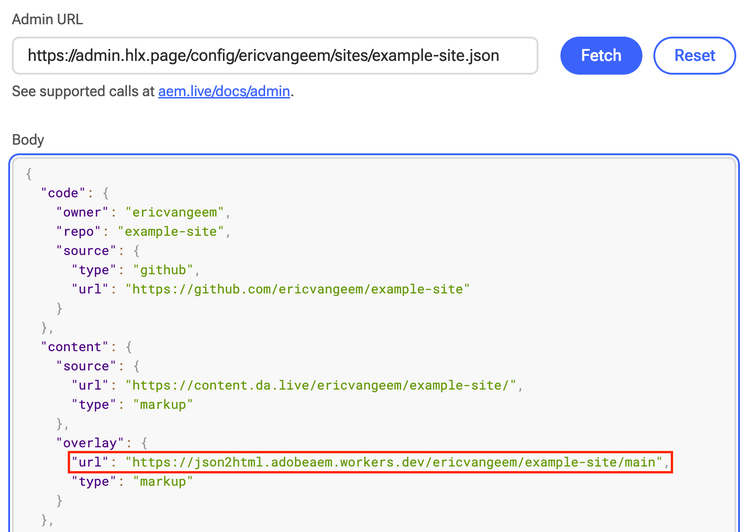
Second, you configure the service itself via a POST request that defines one or more path-based configuration objects, each mapping a URL path pattern on your site to a JSON endpoint and a Mustache template. Full configuration reference is in Adobe's documentation.
That's the setup. The patterns below cover the part that actually varies... where the JSON comes from.
JSON2HTML Patterns
Pattern 1: Spreadsheet
Spreadsheets are a great option for managing simple datasets that don't need to come from a separate database or service.
When to use it: Your dataset is simple and flat, authors are comfortable managing it directly in a spreadsheet, and you don't need enhanced authoring features like field validation or page pickers. This is the lowest-friction entry point for JSON2HTML since there are no external services, no API authentication, and no infrastructure beyond what EDS already provides.
Configuration
We'll use a Locations dataset as an example. A spreadsheet managing a list of office locations, each with a URL path managed by the author.
[
    {
        "path": "/locations/list",
        "endpoint": "https://main--devlive2025--ericvangeem.aem.live/locations.json",
        "template": "https://main--devlive2025--ericvangeem.aem.live/docs/json2html/locations-template.html"
    },
    {
        "path": "/locations/",
        "endpoint": "https://main--devlive2025--ericvangeem.aem.live/locations.json",
        "template": "https://main--devlive2025--ericvangeem.aem.live/docs/json2html/location-template.html",
        "arrayKey": "data",
        "pathKey": "path"
    }
]
Two configurations are defined here for the same data source: one for individual detail pages, one for a single list page containing all locations.
The arrayKey property tells JSON2HTML where to find the records array in the response ("data" in this case, which is the standard EDS spreadsheet structure). The pathKey property tells the service which field in each record contains the URL path for that detail page, meaning authors manage the URL directly in the sheet alongside the content.
The spreadsheet
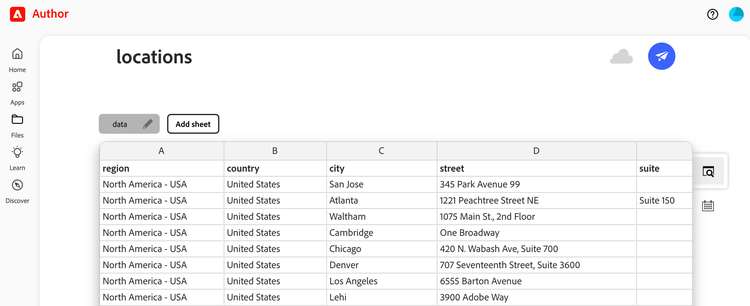
When published, this produces a JSON response structured like:
{
  "total": 70,
  "offset": 0,
  "limit": 256,
  "data": [
    {
      "region": "North America - USA",
      "country": "United States",
      "city": "San Jose",
      "officeType": "Corporate headquarters",
      "street": "345 Park Avenue",
      "state": "CA",
      "zip": "95110-2704",
      "phone": "555-536-2800",
      "fax": "555-537-6000",
      "path": "/locations/united-states/san-jose"
    }
  ],
  "type": "sheet"
}
Mustache template
Since EDS spreadsheets return flat tabular data, template variables are accessed directly from the root context defined by arrayKey. For nested JSON structures, dot notation works as expected ({{path.to.nested.property}}), but with a spreadsheet source you won't have nesting to deal with.
For detail pages, each variable maps directly to a column in the sheet:
<!DOCTYPE html>
<html lang="en">
<head>
    <title>{{city}} - Adobe Office Location</title>
</head>
<body>
    <header></header>
    <main>
      <div>
        <div class="location">
          <div>
            <div>
              <h1>{{city}}{{#officeType}} - {{officeType}}{{/officeType}}</h1>
              <p><strong>Region:</strong> {{region}}</p>
              <p><strong>Country:</strong> {{country}}</p>
              {{#street}}<p>{{street}}</p>{{/street}}
              <p>{{city}}{{#state}}, {{state}}{{/state}} {{zip}}</p>
              {{#phone}}
              <p><strong>Phone:</strong> <a href="tel:{{phone}}">{{phone}}</a></p>
              {{/phone}}
            </div>
          </div>
        </div>
      </div>
    </main>
    <footer></footer>
</body>
</html>
This results in the final HTML, published as a native page to Edge Delivery Services with the core content rendered server-side: https://main--devlive2025--ericvangeem.aem.live/locations/united-states/san-jose
For the list page, Mustache's section syntax iterates over the entire dataset:
{{#data}}
<div class="location-item">
  <h2><a href="{{path}}">{{city}}{{#officeType}} — {{officeType}}{{/officeType}}</a></h2>
  <p>{{region}} · {{country}}</p>
</div>
{{/data}}
Here's the result: https://main--devlive2025--ericvangeem.aem.live/locations/list
My Take
The spreadsheet pattern is the quickest way to get JSON2HTML running. No API keys, no external services, no infrastructure beyond what EDS already gives you. For datasets that are genuinely simple and author-managed, it's a solid fit.
Pattern 2: External API
When to use it: Your data lives entirely outside of AEM like a third-party service, a custom backend, or a SaaS platform, and you want to publish that data as native EDS pages without importing it into AEM first. This pattern treats JSON2HTML as a thin rendering layer over any JSON endpoint.
Configuration
Continuing with our Locations theme, let's say we want to enrich our location detail pages with data from an external Locations API providing ratings, hours, and photos that we don't want to manage manually in a spreadsheet or Content Fragment (as we'll see in the next pattern).
{
    "path": "/locations/",
    "endpoint": "https://api.locations-service.com/v1/locations/{{id}}",
    "regex": "/([^/]+)$",
    "template": "/json2html/location-detail.html",
    "headers": {
        "X-API-Key": "your-api-key-here",
        "Accept": "application/json"
    }
}
A few things to note here compared to the previous pattern:
The regex property extracts the location ID from the URL path using a capture group. The captured value becomes available as {{id}} in the endpoint template. This is the standard approach for external APIs where the record identifier is embedded in the URL rather than resolved via a header like Pattern 3 (covered next).
API Response
Our example API returns a response shaped like this:
{
  "id": "stonepine-mountain-lodge",
  "name": "Stonepine Mountain Lodge",
  "address": "1234 Stonepine Ridge Road, Crestfall, CO 81611",
  "rating": 4.6,
  "userRatingCount": 1284,
  "hours": [
    "Monday: 8:00 AM – 6:00 PM",
    "Tuesday: 8:00 AM – 6:00 PM",
    "Wednesday: 8:00 AM – 6:00 PM",
    "Thursday: 8:00 AM – 6:00 PM",
    "Friday: 8:00 AM – 8:00 PM",
    "Saturday: 7:00 AM – 8:00 PM",
    "Sunday: 7:00 AM – 6:00 PM"
  ],
  "heroImage": "https://api.locations-service.com/images/stonepine-mountain-lodge.jpg"
}
Mustache Template
<!DOCTYPE html>
<html lang="en">
<head>
    <title>{{name}}</title>
</head>
<body>
    <header></header>
    <main>
      <div>
        <div class="location">
          <div>
            <div>
              <h1>{{name}}</h1>
              <p>{{address}}</p>

              <div class="location-hours">
                <h2>Hours</h2>
                {{#hours}}
                <p>{{.}}</p>
                {{/hours}}
              </div>

              <div class="location-ratings">
                <p>⭐ {{rating}} · {{userRatingCount}} reviews</p>
              </div>
            </div>
          </div>
        </div>
      </div>
      <div>
        <div class="metadata">
          <div><div>Title</div><div>{{name}}</div></div>
          <div><div>Description</div><div>{{address}}</div></div>
          <div><div>Rating</div><div>{{rating}}</div></div>
          <div><div>Image</div><div>{{heroImage}}</div></div>
        </div>
      </div>
    </main>
    <footer></footer>
</body>
</html>
My Take
The external API pattern is probably the most common pattern for JSON2HTML. Any JSON endpoint works without having to manage your own infrastructure. For data that already lives in a well-maintained external system, this is often the right call.
Beyond the detail page itself, server-side rendering external API data through JSON2HTML means that data may also be indexed in your site's query-index.json, making it available to other blocks on your site without any runtime API calls. I'll cover how to take advantage of that in Pattern 4.
One consideration is API reliability at preview time. If your external API is slow or unavailable when a preview is triggered, the page either won't publish or will publish stale content. Review the BYOM Limits when evaluating this pattern. If the API can potentially exceed these limits but you still need to use this pattern, consider methods to pre-compute or cache API responses to a more reliable endpoint that your JSON2HTML configuration references instead.
It's also important to note that external API data changes on the API provider's schedule. Your EDS pages are a published snapshot of what the API returned at preview time. Check out the Update patterns section for strategies on keeping these pages in sync with the data source.
Pattern 3: AEM Content Fragments
This JSON2HTML pattern applies if you're using Adobe's Universal Editor on AEM Author as your content management source (a.k.a. XWalk). Adobe has provided support for generating pages via JSON2HTML with AEM Content Fragments.
When to use it: Your authors manage structured content in Content Fragments which are intended for web delivery either as its own dedicated detail page or its content is referenced and included by other pages.
AEM Content Fragments enable a powerful combination of both automated content sync and marketing decoration. Imagine you've developed an integration that syncs data from a 3rd party API into your Content Fragments while also allowing your authors to enrich the fragments with additional AEM content such as DAM assets, tags, additional rich text copy, and other fragment references.
Example: an API syncs core location data (address, hours) into Content Fragments nightly via AEM's Content Fragment OpenAPIs, but doesn't provide a hero banner image. Since the data lives in AEM, authors can associate DAM assets to the fragment directly.
Assets APIs
The example configuration endpoint referenced in the docs uses AEM's Assets HTTP API. This can be a good choice for simpler content fragment structures as it doesn't require any additional configuration to use.
For fragments with more complex structures such as nested fragments or asset references, I've found that AEM's Content Fragment GraphQL API is a powerful feature to use as the configured JSON2HTML endpoint. This is especially useful if your fragment references image assets whose alt text is managed in asset metadata. The GraphQL query can provide the asset URL as well as the metadata alt text which can be rendered in the Mustache template's <img> element.
Note: If you're dealing with nested content fragments whose content is also rendered in the Mustache template, editing and publishing those child fragments in isolation will not trigger a page update. The parent fragment configured to trigger the JSON2HTML rendering will need to be republished in order to update the page's HTML content.
Configuration
Make sure to configure your AEM path mapping as mentioned in the docs. This ensures any fragments published from your configured folder mapping will trigger a preview operation for the mapped URL, thus triggering JSON2HTML to call your configured endpoint.
I've added this configuration for my Location detail pages:
{
    "path": "/locations/",
    "endpoint": "https://author-pxxxx-exxxxxx.adobeaemcloud.com/graphql/execute.json/my-site/locationByPath;path={{headers.x-content-source-location}}",
    "useAEMMapping": true,
    "template": "/json2html/location-gql.html",
    "relativeURLPrefix": "https://author-pxxxx-exxxxxx.adobeaemcloud.com",
    "headers": {
        "Accept": "application/json"
    },
    "forwardHeaders": [
        "Authorization",
        "x-content-source-location"
    ]
}
Note that we're using a Persisted GraphQL Query since we need to support GET requests from the JSON2HTML service.
The {{headers.x-content-source-location}} variable contains the encoded string path to the content fragment in the DAM. This is needed as opposed to using the regex and {{id}} convention since content fragment JCR node names may not always align with the standard EDS URL format.
The useAEMMapping property is worth calling out specifically. Without it, any internal JCR paths found in the content fragment from inline links in RTE fields, fragment references, page pickers, etc. would render verbatim in the published HTML as broken links. Setting useAEMMapping: true instructs JSON2HTML to apply your configured AEM path mappings to those references before the Mustache template is rendered, converting them to correct EDS relative URLs.
Another subtle detail to call out is that the GraphQL service will return an HTTP 200 even if the queried fragment was not found. Conversely, the JSON2HTML service expects a 404 when the previewed path was not found by the configured endpoint. Thanks to the close collaboration with AEM's top engineers Amol Anand and Dirk Rudolph, support for this edge case was added to the internal processing logic of Adobe's JSON2HTML service, in addition to the aforementioned {{headers.x-content-source-location}} and useAEMMapping properties.
Lets continue with some more examples of this pattern.
The Content Fragment
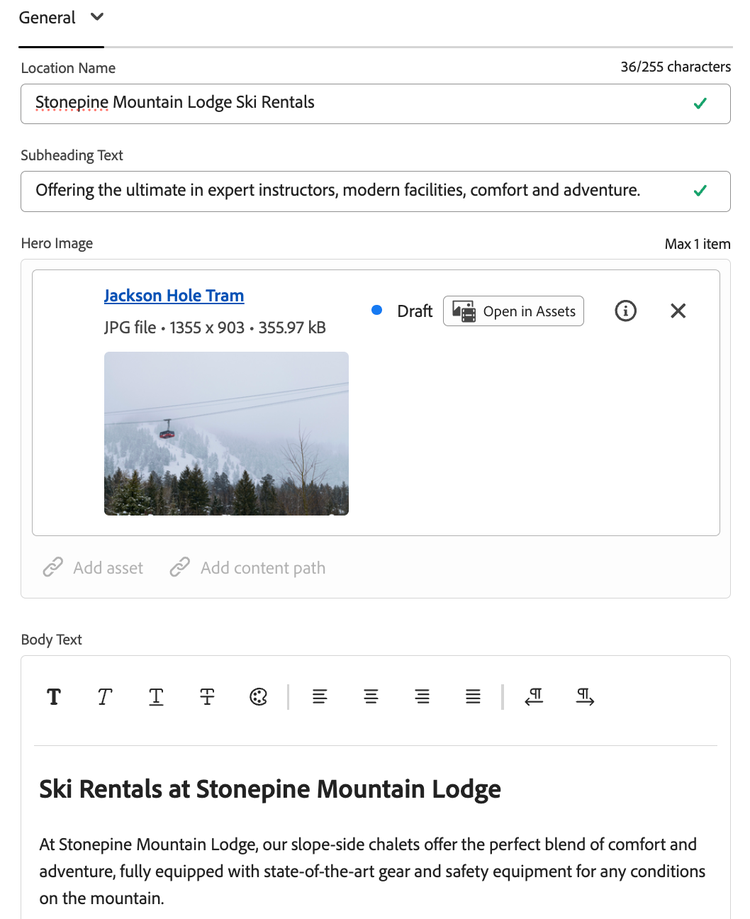
GraphQL JSON
{
  "data": {
    "locationByPath": {
      "item": {
        "_path": "/content/dam/stonepine/fragments/locations/stonepine-mountain-lodge-ski-rentals",
        "locationName": "Stonepine Mountain Lodge Ski Rentals",
        "subheadingText": "Offering the ultimate in expert instructors, modern facilities, comfort and adventure.",
        "locationImage": {
          "_authorUrl": "https://author-pxxxx-exxxxxx.adobeaemcloud.com/content/dam/stonepine/Stonepine/ski_lodge_mountain_view_1600x700.jpg",
          "description": "photo of a scenic mountain view behind a ski resort"
        },
        "bodyText": {
          "html": "<h2>Ski Rentals at Stonepine Mountain Lodge</h2>\n<p>At Stonepine Mountain Lodge, our slope-side chalets offer the perfect blend of comfort and adventure, fully equipped with state-of-the-art gear and safety equipment for any
          conditions on the mountain.</p>\n<p>Our certified instructors specialize in alpine and terrain coaching, with on-mountain guides and ski patrol available 24 hours a day.</p>"
        },
        "streetAddress": "1234 Stonepine Ridge Road",
        "city": "Crestfall",
        "state": "CO",
        "zip": "81611",
        "ratings": 4.6,
        "commentsCount": 35,
        "faqContentFragments": [
          {
            "_path": "/content/dam/stonepine/fragments/faqs/global/what-is-stonepine-resort",
            "question": "What is Stonepine Mountain Resort?",
            "answer": {
              "html": "<p>Stonepine Mountain Resort is a premier mountain destination based in Crestfall, Colorado, serving the greater Rocky Mountain region with ski rentals, slope-side lodging, terrain parks, and specialty instruction
programs.</p>"
            }
          }
        ]
      }
    }
  }
}
Mustache template
<!DOCTYPE html>
<html>
<head>
<title>{{data.locationByPath.item.locationName}}</title>
</head>
<body>
<header></header>
<main>
<div>
<div class="hero">
<div>
<div>
<picture>
<img src="{{{data.locationByPath.item.locationImage._authorUrl}}}" alt="{{data.locationByPath.item.locationImage.description}}">
</picture>
</div>
</div>
<div>
<div>
<h1>{{data.locationByPath.item.locationName}}</h1>
</div>
</div>
<div>
<div>
<p>{{data.locationByPath.item.subheadingText}}</p>
</div>
</div>
</div>
</div>
<div>
<p>{{{data.locationByPath.item.bodyText.html}}}</p>
<div class="section-metadata">
<div>
<div>Style</div>
<div>highlight</div>
</div>
</div>
</div>
<div>
<div class="columns">
<div>
<div>
<h3 id="address">Address</h3>
<p>{{data.locationByPath.item.streetAddress}}</p>
<p>{{data.locationByPath.item.city}}, {{data.locationByPath.item.state}} {{data.locationByPath.item.zip}}</p>
</div>
<div>
<h3 id="ratings--comments">Ratings & Comments</h3>
<div>⭐ {{data.locationByPath.item.ratings}}</div>
<div>{{data.locationByPath.item.commentsCount}} reviews</div>
</div>
</div>
</div>
</div>
<div>
<div class="faqs">
{{#data.locationByPath.item.faqContentFragments}}
<div>
<div>
<h3>{{question}}</h3>
<p>{{{answer.html}}}</p>
</div>
</div>
{{/data.locationByPath.item.faqContentFragments}}
</div>
</div>
<div>
<div class="metadata">
<div><div><p>Title</p></div><div><p>{{data.locationByPath.item.locationName}}</p></div></div>
<div><div><p>Street Address</p></div><div><p>{{data.locationByPath.item.streetAddress}}</p></div></div>
<div><div><p>City</p></div><div><p>{{data.locationByPath.item.city}}</p></div></div>
<div><div><p>State</p></div><div><p>{{data.locationByPath.item.state}}</p></div></div>
<div><div><p>Zip</p></div><div><p>{{data.locationByPath.item.zip}}</p></div></div>
<div><div><p>Ratings</p></div><div><p>{{data.locationByPath.item.ratings}}</p></div></div>
<div><div><p>Comments Count</p></div><div><p>{{data.locationByPath.item.commentsCount}}</p></div></div>
<div><div><p>json-ld</p></div><div><p>
[{
"@context": "https://schema.org",
"@type": "SkiResort",
"name": "{{data.locationByPath.item.locationName}}",
"telephone": "+1-555-123-4567",
"address": {
"@type": "PostalAddress",
"streetAddress": "{{data.locationByPath.item.streetAddress}}",
"addressLocality": "{{data.locationByPath.item.city}}",
"addressRegion": "{{data.locationByPath.item.state}}",
"postalCode": "{{data.locationByPath.item.zip}}"
},
"openingHours": "Mo-Su 08:00-18:00",
"aggregateRating": {
"@type": "AggregateRating",
"ratingValue": "{{data.locationByPath.item.ratings}}",
"reviewCount": "{{data.locationByPath.item.commentsCount}}"
}
}]
</p></div></div>
</div>
</div>
</main>
<footer></footer>
</body>
</html>
Additional Authoring Benefits
The Universal Editor provides a number of authoring features like an interactive page picker, and this feature is still available even with JSON2HTML pages created from Content Fragments.
For this to work, you just need to ensure your path mapping is configured to map the fragments path to the public URL (already a setup requirement from the initial config steps), as well as using the aem-content-fragment field type in any blocks that will reference these pages such as a locations list block.
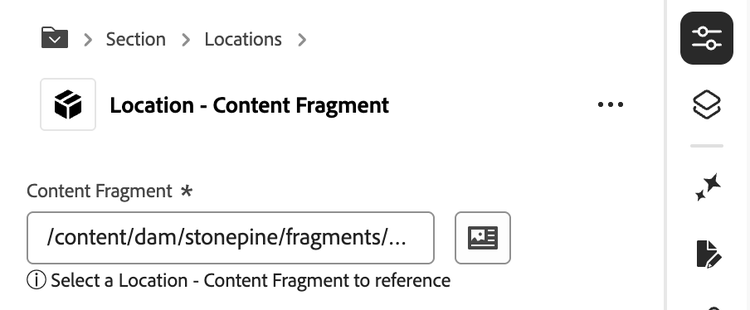
With the above setup in place, your authors can select content fragments from a block and the content fragment path will automatically map to the EDS relative URL on the published page. Note that on the Author instance, the selected content fragment will still be the full JCR path, so your block may need to contain logic to slice the path in order to properly render the content in the UE.
My Take
The Content Fragments pattern is where JSON2HTML starts to feel like an advanced CMS editorial setup. The combination of automated data sync and author decoration is genuinely powerful because your marketing team gets structured authoring in AEM's Universal Editor while your engineering team controls the delivery layer.
That said, there are a few rough edges worth knowing before you commit:
The Sidekick Update button won't work here. Because CF-based pages are resolved through the x-content-source-location header rather than a URL path segment, the standard Sidekick preview flow doesn't apply. Triggering previews for these pages requires publishing the CF from AEM (manual or automated).
Replication frequency. Worth testing with your setup, be mindful of any API rate limits when bulk publishing content fragments. If you notice any issues with publishing JSON2HTML pages at scale, you might implement a custom publishing service that throttles the CF replication queue.
Lastly, there are use cases where you want to fetch Content Fragment data for a single block rather than rendering an entire detail page from it. For these cases, first determine whether client-side GraphQL is actually appropriate, meaning the content doesn't need to carry canonical SEO value. If it is, keep those calls out of the eager loading phase to minimize performance impact, since any uncached requests will hit the AEM Publish origin directly.
Pattern 4: Middleware Orchestration
When to use it: Your data needs to be composed from multiple sources before it can be rendered, or the shape of an external API response needs transformation before it maps cleanly to a Mustache template. Rather than pushing that complexity into the template itself (which has no logic layer), a middleware service such as a Cloudflare Worker acts as a composition and normalization layer, returning a single clean JSON response to JSON2HTML.
Use Case
Continuing the Locations thread one final time, let's say our location detail pages need to combine:
-
External API: core location data
-
EDS Spreadsheet: internal operational data (parking info, accessibility notes)
-
AEM Structured Content: author-managed hero image and promotional copy
- "AEM Structured Content" could refer to traditional AEM Content Fragments or Adobe's Document Authoring (DA) Structured Content feature.
No single source has the full picture. The Worker fetches all three in parallel, merges the results, and returns a unified response to JSON2HTML as if it were a single endpoint.
Configuration
From JSON2HTML's perspective, the Worker is just another URL:
{
    "path": "/locations/",
    "endpoint": "https://my-worker.my-org.workers.dev/locations/{{id}}",
    "regex": "/([^/]+)$",
    "template": "/json2html/location-detail.html",
    "forwardHeaders": [
        "Authorization"
    ]
}
All the complexity is encapsulated in the Worker. Your config and Mustache template stay simple.
The Cloudflare Worker
export default {
  async fetch(request, env) {
    const locationId = new URL(request.url).pathname.split('/').pop();
    const aemToken = request.headers.get('Authorization');

    const [locationData, spreadsheetData, fragmentData] = await Promise.all([
      fetchLocationData(locationId, env.LOCATIONS_API_KEY),
      fetchSpreadsheet(env.SPREADSHEET_URL, locationId),
      fetchStructuredContent(locationId, env.AEM_HOST, aemToken)
    ]).catch(() => {
      return [null, null, null];
    });

    if (!locationData || !spreadsheetData || !structuredContent) {
      return new Response('Not Found', { status: 404 });
    }

    return Response.json({
      locationName: structuredContent?.locationName ?? locationData.displayName.text,
      formattedAddress: locationData.formattedAddress,
      rating: locationData.rating,
      hours: locationData.hours,
      heroImage: structuredContent?.locationImageUrl,
      bodyText: structuredContent?.bodyText,
      parkingInfo: spreadsheetData?.parkingInfo,
    });
  }
};
Promise.all keeps preview response times acceptable by fetching all sources in parallel.
An important callout is that if all of your disparate data sources are required to successfully render the page, make sure your Worker exits early with a 404 response in the event of any failure. The JSON2HTML service will respect that status code and won't attempt to publish the page. This is the same behavior described in Pattern 3 with the GraphQL HTTP 200 edge case, just enforced explicitly by your own middleware rather than the service itself.
Note that calling AEM's APIs only works because Authorization is included in the forwardHeaders array of your JSON2HTML config. This token provided by JSON2HTML is accepted by those APIs.
Example Architecture
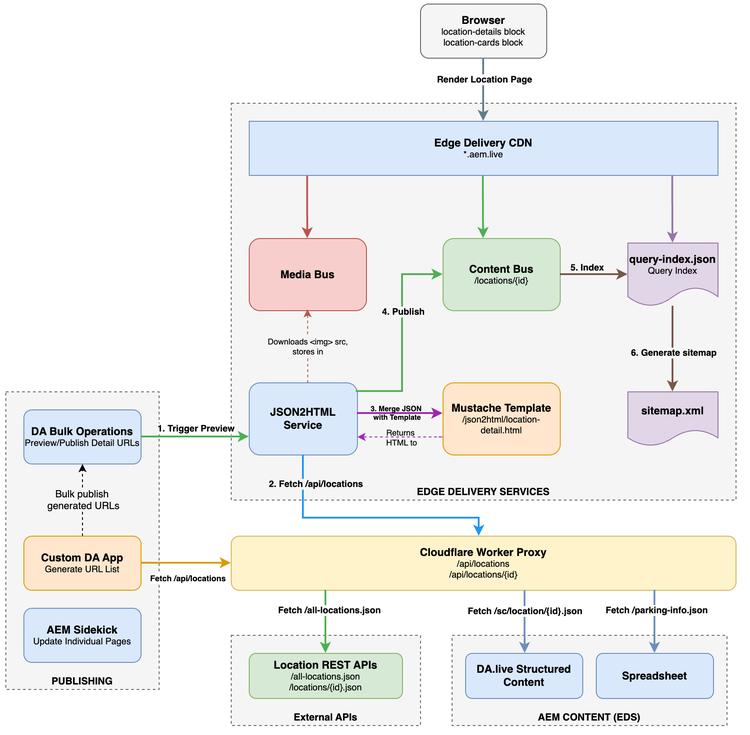
Example architecture diagram of JSON2HTML page generation orchestrated by a Worker fetching content from multiple sources.
Query Index Benefits
The data you render in your Mustache template's content or metadata block can be indexed in a query-index.json. By being deliberate about which fields to include, you can power a Location Cards block that displays name, rating, hours, and hero image across a listing page, all from a CDN-cached index without external API calls at render time. The detail page and the query index are two outputs of the same publication event.
My Take
The Worker pattern is the most powerful of the four but comes with some complexity. You're now owning middleware infrastructure with its own error handling and response caching.
That said, you don't need multi-source composition to justify a Worker. It's worth using even with a single source when the API requires auth flows that can't go in the JSON2HTML config, when the response shape needs transformation before it fits a Mustache template, or when you want a fallback if the live API is unavailable at preview time.
Another practical use I've found for the Worker, even with a single data source, is wrapping a third-party API response to inject a pre-calculated path property on each record, mimicking the spreadsheet pattern from Pattern 1. Without this, every JSON2HTML preview operation triggers its own upstream API call. For APIs that return all records in a single response, caching that at the Worker layer reduces the number of upstream calls to one regardless of how many pages are being published.
Update patterns
JSON2HTML pages don't update themselves. Something has to trigger the Helix Admin /preview API whenever your underlying data changes. The right approach depends on how frequently your data changes and how much of the update process you want to automate.
Ad-hoc page updates
Previewing a page is what triggers JSON2HTML to fetch your configured endpoint and render the page. Internally, this invokes the Helix Admin /preview API. Since these pages don't exist as physical documents in your CMS, the quickest ad-hoc way to trigger a preview is to navigate to the URL on the aem.page domain and click the Update button in the AEM Sidekick. This works for both creating new pages when data is added and updating existing ones when data changes.

While this is a quick way to update dynamic pages ad-hoc, it certainly doesn't scale well when our site has hundreds or thousands of dynamically generated detail pages.
Bulk publish to JSON2HTML
We'll assume Adobe's Document Authoring (DA) is used.
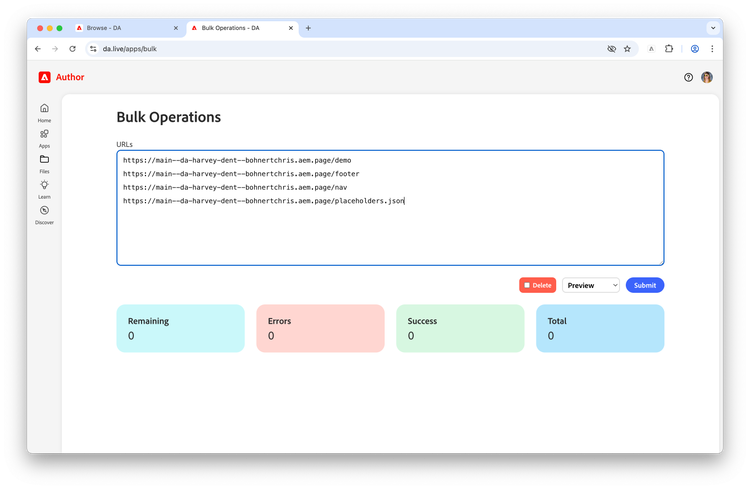
For publishing or updating pages at scale, DA's built-in Bulk Operations app is a straightforward option. All it needs is a list of EDS URLs and handles the preview and publish operations for each.
The more interesting question is how you generate that URL list. For a spreadsheet-based dataset, the paths can be copied from the sheet itself. For an external API, you need a way to enumerate all the records and derive their corresponding EDS URLs.
This is where DA Apps shines. Developing apps in DA is intentionally lightweight and easy to create custom authoring tools.
For example, a simple DA app that:
- Fetches all records from your configured API or spreadsheet
- Derives the EDS URL for each record based on your path convention
- Renders the list in a copyable format ready to paste into Bulk Ops
keeps the entire workflow inside DA without requiring any developer intervention for routine bulk publish operations.
Automated Updates
The most architecturally sound option to keeping JSON2HTML pages in sync with their data is an event-driven process that triggers a preview and publish operation when data changes at the source.
Event-Driven Updates
When your data source changes, it needs to ultimately call the Helix Admin /preview and /live APIs for the affected URLs. There are two paths to get there:
Direct trigger: the source system fetches an IMS token and calls the Helix Admin APIs itself. This is the simplest path when your source system supports outbound HTTP calls and you're comfortable implementing the token exchange logic there.
Webhook trigger: the source system calls a webhook, such as a GitHub Actions workflow_dispatch endpoint, which handles the IMS token fetch and Admin API calls. This adds a layer of indirection but comes with an operational benefit: every triggered update is visible in the GitHub Actions console with a full audit trail including when it ran, what it processed, and whether it succeeded. For production systems where traceability matters, this is worth the extra step.
In either case, the source system only needs to trigger updates for the records that actually changed, not every record in the dataset.
Scheduled Fallback
Not every data source supports webhooks or outbound event notifications. For these cases, a scheduled job is a valid fallback, but a naive implementation that loops over every record and calls the Admin API for each on every run is both wasteful and potentially rate-limiting.
A more efficient approach is to implement change detection. A GitHub Actions cron job can persist the API response as a static JSON file committed to the repository on each run, then diff the next scheduled response against the stored version to identify only the changed records before triggering Admin API calls. This keeps the update surface minimal even on a polling-based cadence.
name: Scheduled Location Sync

on:
  schedule:
    - cron: '0 2 * * *'
  workflow_dispatch:

jobs:
  sync-locations:
    runs-on: ubuntu-latest
    steps:
      - uses: actions/checkout@v4

      - name: Fetch latest API response
        run: |
          curl -s "https://api.locations-service.com/v1/locations" \
            -H "X-API-Key: ${{ secrets.LOCATIONS_API_KEY }}" \
            > locations-latest.json

      - name: Detect changes
        id: diff
        run: |
          CHANGED=$(node -e "
            const prev = require('./locations-cache.json');
            const next = require('./locations-latest.json');
            const changed = next.data.filter(record => {
              const match = prev.data.find(p => p.id === record.id);
              return !match || JSON.stringify(match) !== JSON.stringify(record);
            }).map(r => r.path);
            console.log(changed.join('\n'));
          ")
          echo "paths=$CHANGED" >> $GITHUB_OUTPUT

      - name: Update cache
        run: cp locations-latest.json locations-cache.json

      - name: Commit updated cache
        run: |
          git config user.name "github-actions"
          git config user.email "actions@github.com"
          git add locations-cache.json
          git commit -m "chore: update locations cache" || echo "No changes to commit"
          git push

      - name: Get IMS Token
        id: ims
        run: |
          TOKEN=$(curl -s -X POST "https://ims-na1.adobelogin.com/ims/token/v3" \
            -d "grant_type=client_credentials" \
            -d "client_id=${{ secrets.IMS_CLIENT_ID }}" \
            -d "client_secret=${{ secrets.IMS_CLIENT_SECRET }}" \
            -d "scope=<scopes>" \
            | jq -r '.access_token')
          echo "token=$TOKEN" >> $GITHUB_OUTPUT

      - name: Preview and Publish Changed URLs
        run: |
          for PATH in ${{ steps.diff.outputs.paths }}; do
            curl -s -X POST "https://admin.hlx.page/preview/myorg/mysite/main$PATH" \
              -H "Authorization: Bearer ${{ steps.ims.outputs.token }}"

            curl -s -X POST "https://admin.hlx.page/live/myorg/mysite/main$PATH" \
              -H "Authorization: Bearer ${{ steps.ims.outputs.token }}"

            sleep 3
          done
Choosing the Right Pattern
The four patterns in this post aren't mutually exclusive. A mature EDS site might use all of them simultaneously across different sections of the site.
JSON2HTML is a deceptively simple service. The config is minimal, the Mustache templates are straightforward, and Adobe manages the infrastructure. What takes thought is everything around it such as where your data comes from, how your authors interact with it, and how your pages stay fresh. That's what these patterns are really about.
Want to share your thoughts or unique experiences with JSON2HTML? Lets talk!
Resources
- JSON2HTML Docs
- JSON2HTML simulator — Simple tool to build and test Mustache templates
- BYOM Docs